

Best Laptop for engineering students under 50000 come with Ryzen 5 or Intel i5 processors, 16GB RAM options, and fast SSDs. At a glance, the configuration looks sufficient for coding and development work. The difference shows up with regular usage.
Running VS Code with multiple extensions, keeping 10–15 browser tabs open, and switching between terminal, debugging tools, and meetings puts continuous load on the system. Over time, many budget laptops start to struggle with thermals, multitasking, and sustained performance.
This is where most buying decisions go wrong. This guide focuses on real world coding usage how these laptops perform during long sessions, handle multitasking, and stay consistent over time.
At Truedime.in, we don’t rely only on specs or brand claims.
- Based on 1,180+ verified laptop reviews
- 360+ student users analyzed
- 160+ low-rated reviews studied to uncover real issues
- Sources include Amazon, Flipkart, and student forums
Instead of depending only on ratings, we look at how these laptops perform for students over months of usage.
We identify problems like struggles with heavy software (AutoCAD, MATLAB), heating, battery limitations, and long term durability issues.
This gives a realistic picture of how the laptop holds up throughout academic use not just initial impressions.
Let's Get Real: The 50000 Laptop Reality Check
At the ₹50,000 price point, you're not hunting for the perfect laptop you're choosing the least problematic one for your specific needs. Every laptop in this range comes with its own set of trade offs.
Most regrets happen not because someone picked a bad model, but because they picked the wrong type of laptop for their primary use case. Our goal here is to help you avoid that common pitfall.
Things to Look for Before You Swipe Into Engineering laptops
Processor
- 6-Core Ryzen 5 or Intel i5 (12th Gen+)
- Engineering tools like MATLAB and AutoCAD are CPU-heavy.
RAM
- 16GB Dual Channel
- 8GB is dead in 2026. You need 16GB for multitasking and virtual machines.
Storage
- 512GB NVMe Gen 4 SSD
- Fast boot times and quick project loading are non-negotiable.
Display
- FHD (1920x1080) IPS
- You’ll be staring at this for 10+ hours a day. Avoid TN panels at all costs.
Build
- Metal or Reinforced Polycarbonate
It needs to survive being shoved into a backpack for four years.
Smart Picks: Best Laptop for Engeneering Students under 50000 (2026)
Price unavailable right now
For engineering students who prioritize a premium feel and robust build quality without breaking the bank, the Acer SmartChoice Aspire Lite (AL15-41) is a standout option.
Its standout feature is the premium metal body, which not only lends a sophisticated aesthetic but also contributes to better thermal management a significant advantage when running moderately intensive engineering software.
CPU Architecture: AMD Ryzen 5 5625U based on Zen 3 mature and power efficient architecture with strong sustained performance
Core Configuration: 6 cores or 12 threads well suited for parallel workloads like compiling code, running scripts, and multitasking
Performance Profile: Delivers stable performance under continuous load, often more consistent than entry level Intel U-series in long sessions
Integrated Graphics: Radeon iGPU capable of handling light graphical workloads, UI rendering, and basic 2D design tasks
Memory Handling: 16GB DDR4 sufficient headroom for IDEs, browsers, and background processes without frequent slowdowns
Storage Performance: NVMe SSD fast read and write speeds improve boot time, file access, and development workflow responsiveness
Weight: 1.59 kg easy to carry between classes, labs, and daily commute
Display: 15.6-inch Full HD enough workspace for coding, browsing, and documentation
Portability: Slim and lightweight design suited for regular student use
Build Quality: Metal chassis is better durability than typical budget laptops
Finish: Steel Gray has clean look, less prone to fingerprints
Ports: Includes USB-A and HDMI for essential connectivity
Charging: Uses barrel charger (no USB-C charging support)
Price unavailable right now
CPU Architecture: Zen 2 focused on efficiency and stable everyday performance
Core Configuration: 4 cores / 8 threads suitable for coding, scripts, and multitasking
Performance Profile: Consistent, cool, and quiet under continuous use
Integrated Graphics: Handles UI, basic design, and light tasks (not for heavy 3D work)
Memory Handling: 16GB LPDDR5 smooth performance with IDEs and multiple apps
Storage Performance: NVMe SSD faster boot, file access, and workflow
Weight: 1.63 kg easy for daily carry
Display: 15.6 inch FHD enough workspace for coding and browsing
Portability: Slim and student friendly
Build Quality: Durable PC ABS body for regular use
Finish: Clean look, less fingerprint visibility
Ports: USB A, HDMI, Ethernet, Type C included
Charging: Supports Type C Power Delivery
Price unavailable right now
CPU Architecture: 6nm Zen 2 (Mendocino) optimized for power efficiency and stable long session performance
Core Configuration: 4 cores / 8 threads handles coding, MATLAB scripts, and multitasking smoothly
Performance Profile: 15W TDP ensures cool, quiet, and consistent performance under load
Integrated Graphics: Radeon 610M (2 cores) suitable for UI, basic CAD, and light tasks (not for heavy 3D)
Memory Handling: 16GB LPDDR5-5500 strong headroom for IDEs, browsers, and background apps
Storage Performance: NVMe SSD fast boot times and quicker file access
Weight: 1.59 kg lightweight and easy to carry for daily college use
Display: 15.6 inch FHD with micro-edge bezels; 250 nits brightness (best for indoor use)
Portability: Slim design fits easily into backpacks without adding bulk
Build Quality: Durable chassis with a clean, professional silver finish
Finish: Smooth, premium feel with decent resistance to daily wear
Ports: USB A, HDMI 1.4b, and Type C for essential connectivity
Charging: HP Fast Charge ~50% in 45 minutes
Price unavailable right now
For engineering students who want a powerful yet portable laptop with premium essentials, this is a strong pick.
The combination of Ryzen 7 (8-core) + 16GB RAM ensures smooth multitasking across coding tools, simulations, and online classes.
CPU Architecture: 7nm Zen 3 (Barcelo-R) efficient and reliable for long sessions
Core Configuration: 8 cores / 16 threads strong for coding, MATLAB, and multitasking
Performance Profile: 15W TDP keeps performance cool and stable under load
Integrated Graphics: Radeon (8 cores) handles UI, light CAD, and basic workloads
Memory Handling: 16GB DDR4 smooth performance with IDEs and multiple apps
Storage Performance: NVMe SSD faster boot and quicker file access
Weight: 1.79 kg manageable for daily carry
Display: 15.6" FHD, 300 nits good for indoor usage
Portability: Slim and backpack friendly
Build Quality: Durable chassis with clean silver finish
Finish: Smooth, premium feel for everyday use
Ports: USB-A, HDMI, and Type C for connectivity
Charging: 65W fast charging support
Price unavailable right now
CPU Architecture: 7nm Zen 3 (Barcelo) efficient and reliable for long sessions
Core Configuration: 6 cores / 12 threads handles coding, scripts, and multitasking well
Performance Profile: 15W TDP ensures cool and stable performance
Integrated Graphics: Radeon (7 cores) suitable for UI, basic CAD, and light tasks
Memory Handling: 16GB DDR4 smooth performance across IDEs and apps
Storage Performance: 1TB NVMe SSD fast speeds with ample storage capacity
Weight: 1.79 kg manageable for daily carry
Display: 15.6" FHD, 300 nits good for indoor usage
Portability: Slim and backpack friendly
Build Quality: Durable chassis with clean silver finish
Finish: Smooth, premium feel for everyday use
Ports: USB-A, HDMI, and Type C for connectivity
Charging: 65W fast charging support
Quick Compare: Best Laptop for Engineering Students Under 50000


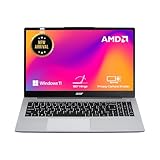

acer SmartChoice Aspire Lite
Lenovo V15 G4 AMD Ryzen 5 7520U
HP 15, AMD Ryzen 5 7520U,
acer Aspire, AMD Ryzen 7-7730U
acer Aspire Lite, AMD Ryzen 5-5625U
acer SmartChoice Aspire Lite
Lenovo V15 G4 AMD Ryzen 5 7520U
HP 15, AMD Ryzen 5 7520U,
acer Aspire, AMD Ryzen 7-7730U
acer Aspire Lite, AMD Ryzen 5-5625U
Engineering students, regardless of their specialization, often require a laptop capable of handling demanding software, complex simulations, and extensive research. While a robust processor and ample RAM are universal needs, those pursuing Computer Science, IT, or related programming intensive fields have unique requirements.
For a detailed breakdown of machines optimized for development environments, including specific recommendations that balance performance with affordability, Explore into our comprehensive guide on the Best Laptop for Coding and Programming Under 50000.
Frequently Asked Question (FAQ)
Conclusion: Choosing the Right Engineering Student Laptop Under 50000
Choosing the right laptop as an engineering student isn’t just about specs it’s about how well the device handles your daily workload over time. From coding and simulations to managing multiple tools and study materials, you need a system that stays consistent and responsive, not just fast on day one.
In this budget, laptops with 16GB RAM and SSD storage make a noticeable difference, especially when working with IDEs, browser tabs, and engineering software together. The options listed here are selected based on real user feedback and long term usage patterns, focusing on what actually works in practical scenarios.
Instead of chasing the highest specs, choose a laptop that fits your workflow whether that’s performance, storage, or overall stability. That’s what will matter throughout your academic journey.
Final verdict
If you want a laptop that gives you both smooth performance and plenty of storage for your projects, the HP 15, AMD Ryzen 5 7520U,(16GB LPDDR5, 512GB SSD), Anti-Glare, Micro-Edge, FHD, 15.6''/39.6cm, Win 11, Office 24,M365 Basic(1yr)*,Silver, 1.59kg, fc0690au, FHD Camera, Backlit KB Laptop is a smart choice.
With 16GB RAM and a 1TB SSD, it handles multitasking comfortably while giving you enough space for large files, tools, and long term usage. It may not be the most powerful option available, but it strikes a strong balance between performance and storage, making it ideal for students who don’t want to worry about upgrades anytime soon.
You can explore Other Engineering students laptop options here: Laptops for Engineering Students
.